Online Marketing can boost your traffic and grow your business.
Get best tips, tricks and strategies related to SEO, Digital Marketing, Internet Marketing, Content Marketing, Social Media and Search Engine Marketing(SMO, SEM).
A Guide to Google Search Console (GSC)
Get link
Facebook
X
Pinterest
Email
Other Apps
Google Search Console (previously known as Webmaster Tools) is a collection of tools to help make sure your website is healthy and Google-friendly. But it does so much more than that.Not only it can help you diagnose any technical SEO issues, it can also help you understand your most popular pages, see where you are ranking, and help you increase your organic traffic.
Google Search Console (or GSC) is completely free and any website, regardless of the platform it is built on, can use it. And to get the most from it, you need to set it up correctly, understand what the metrics mean, and know how to access its features.
Google Search Console Introduction Google Search Console is a collection of tools and reports that allow webmasters and SEO's to monitor, manage, and improve their websites. It is a web service provided by Google free of charge, that gives you information about your website and the people who visit it. GSC can make optimizing your website much easier.
How to Access the Google Search Console?
Google Search Console (GSC) is a collection of free tools and reports that allow webmasters to monitor and manage their websites’ presence in Google Search results. To access the new Search Console, follow these steps:
Add your website as a property to GSC by choosing one of the different ways allowed
Verify your account using HTML file, HTML tag, Google Analytics, Google Tag Manager
Steps to Set up Google Search Console :
Step 1 — Sign in to Your Google Account
First things first: make sure you are signed into your Google account. If you have separate business and personal account, make sure you use the Google account you want associated with your website.
Step 3 — Add a New Website to Google Search Console
If this is the first website you have set up in GSC, you should see this welcome message (just hit “Start“)
or
from the dropdown, select “+ Add property”
Step 4 — Add Your Domain
As your property type, choose Domain and then enter the URL of your site. Just make sure to use the exact URL
Step 5 — Verify Your Account (+ Alternative Methods)
Now you need to verify your website. Copy the GSC tokenized DNS TXT record and add it to your domain name provider to verify domain ownership.
If you don’t want to (or can’t) verify your domain this way don’t worry. Head back to the select property type and choose URL prefix.
Ways to Verify your Site Ownership in GSC:
HTML File: upload an HTML file to your website
HTML Tag: add a meta tag to your site’s homepage
Google Analytics: use your Google Analytics account
Google Tag Manager: Use your Google Tag Manager account
Google Search Console Tools and Reports
GSC tools are divided into 6 Categories as below :
Performance
URL check
Index
Improvement
Safety and manual measures
Links
1 ) Performance Report/Analysis
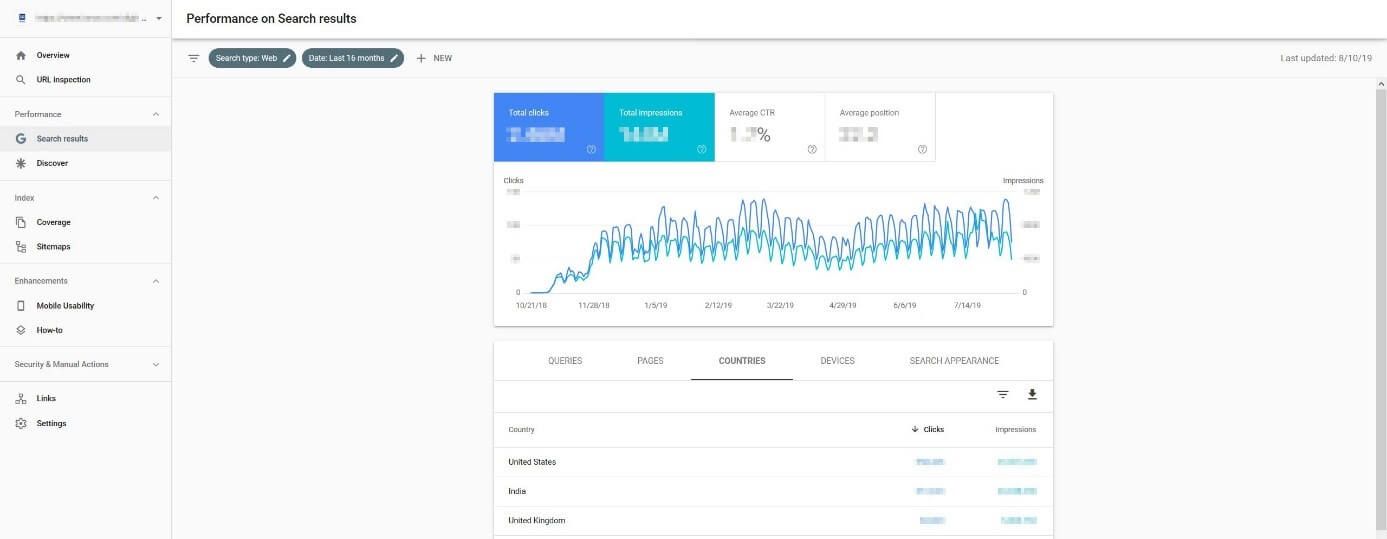
In the “Performance” section, the Google Search Console lists the examined domain’s central performance data – i.e. the total number of impressions and clicks (including the resulting click-through rate), as well as the average position of the pages in Google’s rankings.Additionally, there is detailed information about the background of page views and impressions, just like with Google Analytics. With this information, website operators don’t just find out which search queries were used, but also which URLs have the most traffic. On top of this, you can also see which devices (mobile, desktop, tablet) visitors have used to access the website, as well as from which countries, and what their search results looked like.
2) URL Inspection
URL Inspection is a small, but powerful tool that can be found either on the left side of the menu or directly in the search box in Google Search Console’s top menu bar. Any URL that belongs to the verified domain can have its indexing status checked like this. If a page is not yet in the Google index, it can be requested. Additionally, Search Console provides tips for improving the page if optimization is lacking – which can often be the case on mobile devices, for example.
3) Check Site Index Status
The GSC category “Index” consists of two analysis functions. All the information related to indexing for the entire project can be found under “Coverage”. The Search Console presents all indexed pages and all pages excluded from indexing. For the latter, the tool also provides figures on why they are not being taken into account. Among others, the following reasons may be given:
Pages excluded with a “noindex” tag
Alternative site with the correct canonical tag
Pages work forwarding
Crawled, but not currently indexed
Found, but not currently indexed
Blocked by robots.txt files
Crawling anomalies
404-errors
Duplicates
4) Improvements
Website operators can use the Improvements menu item to get concrete suggestionsfrom Google to optimize usability. The mobile-first approach is given the highest importance, which is why the majority of tips are aimed at optimally displaying the site on smartphones and tablets. For example, users will receive information about specific errors when using accelerated mobile pages or about typical weak points – like hard-to-read blocks of text or un-clickable elements.
5) Safety and manual measures
Google has a quality policy for website operators which should be adhered to if you want to have good rankings in their search engines. Anyone who tries to manipulate the search index will face sanctions from Google – with possible penalties ranging from a downgrading of the ranking to being deleted entirely from the search results. In the “manual measures” section, users can check whether their own website is affected by these measures.
The second entry, known as “Security Issues” also tells you how secure your web application is. If Google detects security deficiencies, it will let you know at this point – whether it’s spam, malware or unusual downloads.
6) Links
Internal and external links are among the most important building blocks of a successful website. Well-placed links benefit visitors and are therefore highly valued by Google. It is no coincidence that the Google Search Console provides detailed data on all existing inbound and outbound links in the “Links” menu. The external links can even be exported, thanks to the corresponding function.
Difference between New and Old Search Console :
Since Google Webmaster Tools was renamed to Search Console, the Google Web Analytics suite has undergone some minor and some major changes. In 2018 the new, extensively revised GSC version was finally released after an extended beta phase, but still contains an option to revert to the old version – however, in most cases, users are unable to use data to find information on the old version.
Key innovations in the new Google Search Console include:
The new version of the web analytics suite works fine on mobile devices.
Optimized display of all data including new filter options.
Performance data on search queries, clicks and so on can be accessed from the last 16 months. Previously, only information from the last 3 months was available.
Information on individual pages is much more detailed.
Hope the article provides you detailed insights to google search console. Please comment below for any queries.
What is Voice Search? Voice search is a speech recognition technology that allows a user to perform a search via a voice command. Although designed to be a software application, voice search also may be used as a service by smartphones and other small Web-enabled devices. Voice Search Trends: 25 percent of searches on Windows 10 desktop are done with voice. 50 percent of the searches will be done via voice by 2020. 20 percent of all mobile queries on Google are voice search. 55% of teens and 41% of adults use voice search daily. What are the popular devices used for Voice search? Top 7 voice search devices are as below : Google Home Amazon Echo/Alexa Google Assistant Siri Assitant Android Devices Microsoft Cortana How to Optimize Voice Search : Voice Search SEO Guide Optimize for Featured Snippet result and People Also Ask (PAA) Links - Add questions and answers in your content Use Long tail keywords Use m...
What is Content Marketing? Content marketing is a way to get traffic to your website using multimedia rich and shareable content in order to generate leads and build relationships with prospects. A good content marketing strategy is an absolute must in this modern era of marketing. Different types of content categorization: Blogging , which can happen on your own site (“owned media”) or involve guest blogging for other publications, and can include text, images, infographics and videos E-books or white papers , which are often used as lead magnets to capture information like a user’s email address Email newsletters , which can build relationships with readers and encourage them to head back to your site Webinars and other video content , which can help you convey your brand personality and increase user engagement (especially since video has become very popular) Landing pages, which are hosted on your own site and direct users to click a button to find out further informati...
What is Customer Review and Why it is Important? A customer review is the review of any product or services as given by the customer who has used the product or service. Customer reviews or User reviews are a form of customer feedback on e- commerce and online shopping sites. There are many dedicated review sites , some of which use customer reviews as well as or professional reviews. These reviews give users opinion about the usefulness and accuracy of a product or service. Top 10 Customer and Business Review Websites Website U.S. Alexa Ranking Category Avg. Monthly Traffic % U.S. Traffic (of Total) Google My Business 1 any business 158.03 million 26.90% Facebook 3 any business 85.57 million 27.30% Amazon 4 e-commerce related 85.44 million ...


Comments
Post a Comment